Building Agents in Bob with a Software Spec Driven Approach

 Photo by Godfrey Njagenchi on Unsplash
Building Agents in Bob with a Software Spec Driven Approach
Agentic systems become easier to build, review, and evolve when they are treated like software products instead of clever prompts. Bob’s dedicated skills support exactly that style of work: start with business intent, turn it into explicit specifications, generate implementation artifacts, and then analyze the result against the design.
In this post, I describe how to use Bob and four dedicated skills as an end-to-end, spec driven workflow for creating watsonx Orchestrate (wxO) agentic solutions.
Why Spec Driven Agent Development Matters
Traditional agent building often starts with a prompt and quickly jumps into tools, flows, and integrations. That can work for experiments, but it becomes fragile when the solution has real business logic, compliance expectations, system integrations, or multiple collaborators.
A software spec driven approach flips the sequence:
- Define the business problem before choosing the implementation.
- Produce architecture and process specifications before generating code.
- Keep business rules legible in Standard Operating Procedures (SOPs).
- Generate wxO artifacts from the agreed specification.
- Analyze the implementation and feed findings back into the next iteration.
In this framework, the specification is not a bulk of documentation that none reads and gets under the deck of work to be done for a client. It is the contract that the developer signs with the agent.
The Bob Skill Pipeline
We can bring into the Bob’s workspace (global or at the project level) four specialized skills that form a complete pipeline for designing, building, and auditing wxO agentic solutions:
| Skill | Primary Question | Output |
|---|---|---|
solution-architect | What should we build, and why? | Solution overview, architecture, and implementation plan |
sop-builder | How should the business process work? | Structured SOP with process flow, data needs, rules, and decisions |
wxo-builder | How do we turn the spec into wxO artifacts? | Importable wxO project with agents, tools, flows, connections, and scripts |
wxo-analyzer | Does the implementation match expectations? | Documentation and audit reports for an existing wxO project |
The skills are avaialble in the GitHub repository for wx Orchestrate ADK. We can clone the repo and import the folders into our project.
The important pattern is that each skill produces the input for the next one. That makes the workflow traceable from business problem to deployed solution.
Step 1: Start with solution-architect
Use solution-architect when you have a business problem or use case, but no technical design yet.
Example prompt:
I need an AI agent that processes invoices from a shared mailbox, extracts invoice data, validates it against vendor records, and prepares a SalesForce update.
The goal at this stage is not to write code. The goal is to create a shared understanding of the solution.
The agent using the solution-architect skills should produce three key documents:
| Document | Purpose |
|---|---|
| Solution Overview | Captures the executive summary, business context, problem statement, and agent requirements |
| Solution Architecture | Describes components, integrations, data flow, security, and architecture diagrams |
| Implementation Plan | Breaks the work into phases, assumptions, constraints, and SOP candidates |
The implementation plan is especially important because it decomposes the solution into business processes that can be specified independently.
Step 2: Convert Architecture into SOPs with sop-builder skills
Use sop-builder skills when you have an architecture document, workflow description, BPMN model, Langflow export, n8n export, or any other process-oriented input.
This skill turns design intent into a plain-language Standard Operating Procedure. That SOP becomes the specification for implementation.
A good SOP includes:
- Business process flow diagrams
- Business context and problem statement
- Input, processing, and output data requirements
- Business rules and decision points
- Integration expectations
- Error handling and escalation behavior
This is where the spec driven approach becomes practical. Instead of embedding business logic directly in generated tools or agent instructions, you first make that logic visible and reviewable.
Example prompt:
Build the SOP for the invoice extraction and validation flow from the implementation plan.
For larger solutions, a good option can be creating one SOP per major flow. A single monolithic SOP usually hides important decisions and makes generation harder to review.
Step 3: Generate the wxO Solution with wxo-builder skills
Use Bob with wxo-builder skills when you have an SOP or a very clear build prompt and want actual watsonx Orchestrate artifacts.
This is the point where Bob moves from specification into implementation. Given a strong SOP, wxo-builder can generate an importable wxO project structure such as:
my_solution/
  agents/
    my_agent.yaml
  tools/
    my_tool.py
    my_flow.py
  connections/
    my_connection.yaml
  main_flow.py
  import-all.sh
The agent with the builder skills can create:
- Native wxO agents
- Python tools with correct decorator and docstring conventions
- Flow Builder patterns for document processing, user activity, conditional logic, and multi-agent workflows
- Knowledge base configurations
- Connection YAML files for credential management
- Import scripts for repeatable setup
The quality of the generated solution depends heavily on the quality of the SOP. If the SOP defines the business rules, data contracts, exception paths, and integration behavior, the builder has fewer assumptions to invent.
Example prompt:
Generate the wxO solution from this SOP. Create the agent configuration, required Python tools, connection specs, and import script.
This step should usually happen in Agent mode because it writes project files. Note that you can further empower the agent mode by giving MCP connections to the Orchestrate documentation through the wx orchestrate ADK. However, a downside of MCP connections is larger token consumptions. An alternative method would be using the CLI skills approach by Floring Manila and Niklas Heidoff as explained in this blog.
Step 4: Audit and Document with wxo-analyzer skills
Use wxo-analyzerskills when you have an existing wxO project and want to understand, document, or audit it.
The Agent with the analyzer skills should produce a three-report documentation set:
| Report | Purpose |
|---|---|
| Solution Overview | Summarizes architecture, components, and file structure |
| Agent Analysis | Breaks down each agent, its tools, collaborators, instructions, and LLM settings |
| Tools and Components | Reviews flows, Python tools, connections, knowledge bases, and implementation patterns |
This closes the loop. After generating or modifying a solution, analyze it and compare the reports against the original architecture and SOPs.
Useful review questions include:
- Does the generated agent follow the intended process?
- Are business rules represented explicitly?
- Are credentials handled through connections instead of hardcoded values?
- Are error paths and escalation paths implemented?
- Are tools too large, too ambiguous, or missing validation?
- Does the implementation introduce behavior that was not in the SOP?
The output of the step obtained with wxo-analyzer skills can feed back into the tasks for the sop-builder or wxo-builder for refinement.
A Practical End-to-End Flow
Here is the full workflow in one sequence:
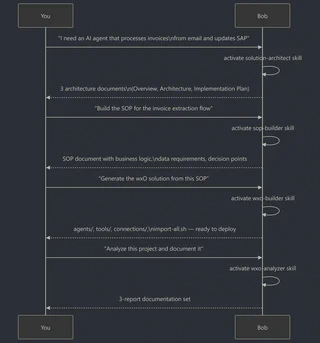
Business problem
  -> solution-architect
  -> Solution overview, architecture, implementation plan
  -> sop-builder
  -> Standard Operating Procedure
  -> wxo-builder
  -> Importable wxO project
  -> wxo-analyzer
  -> Audit reports and improvement backlog
Best Practices for Spec Driven Agent Work
Start with architecture for non-trivial use cases. If the solution touches multiple systems, users, approval steps, or data sources, begin with solution-architect skills.
Keep SOPs focused. One SOP per flow makes the specification easier to review and easier for wxo-builder skills to implement cleanly.
Treat the SOP as the contract. The SOP should define data inputs, outputs, business rules, decisions, and exceptions clearly enough that implementation choices can be checked against it.
Build from reviewed specs. Do not rush from a vague idea to generated code. The fastest path is usually to clarify the spec first.
Analyze after building. Call the agent with the wxo-analyzer skills after generation or major changes so the project can be reviewed for missing error handling, hardcoded credentials, oversized flows, or behavior that drifted from the SOP.
Iterate deliberately. When the agent finds gaps, update the SOP or architecture first when the gap is conceptual. Update the wxO implementation when the spec is right but the build needs refinement.
What This Changes
Bob’s dedicated skills make agent development like professional software delivery.
The workflow creates a chain of accountability:
- Business requirements explain why the agent exists.
- Architecture explains how the solution should fit together.
- SOPs explain how the work should happen.
- wxO artifacts implement the agreed process.
- Analyzer reports show what was actually built.
That chain is what makes agentic systems deliverable and maintainable. It gives teams a way to discuss requirements, review logic, generate implementation, and audit the result without losing the thread between business intent and technical behavior.
When used together, solution-architect, sop-builder, wxo-builder, and wxo-analyzer skills turn Bob into a spec driven agent factory: one that can move from idea to implementation while keeping the reasoning visible at every step.
